
6k
Downloads
277
Reviews
Latest Version
Version

Special K Download Free for Windows (Latest Version)
PC games do not always run the way players expect. Some titles suffer from frame pacing issues, limited graphics options, input lag, or performance problems that are difficult to fix through built-in settings alone. Special K is designed to solve many of these issues by giving users advanced control over how games perform and behave on Windows.
This powerful game enhancement utility provides detailed performance monitoring, frame rate management, HDR improvements, graphics customization, and various optimization tools. It works with a wide range of PC games and is widely used by gamers who want better performance, smoother gameplay, and more control over their gaming experience.
If you are looking for a lightweight tool that can improve game performance and provide useful diagnostics, Special K is worth considering.
What is Special K?
Special K is an advanced game enhancement and diagnostic framework for Windows. It allows users to modify, monitor, and optimize various aspects of PC games without changing the game’s original files.
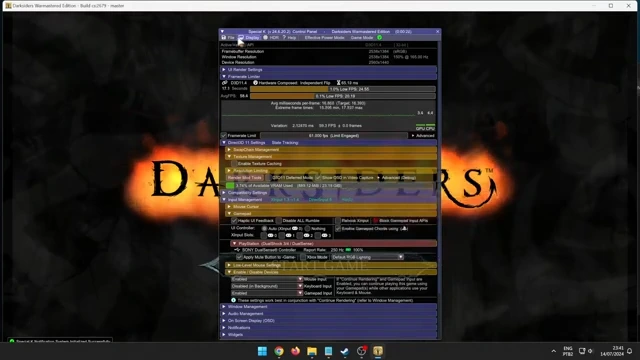
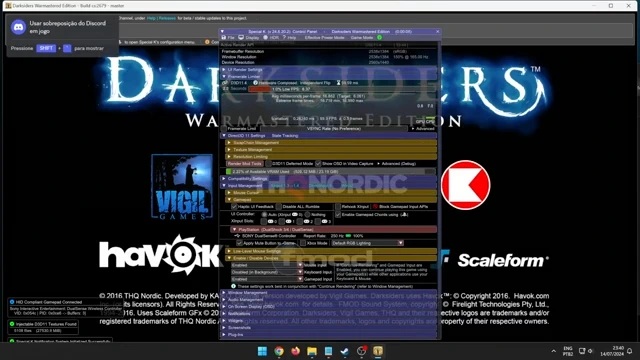
The software is particularly popular among PC gaming enthusiasts because it offers features that are often missing from many games. Users can monitor GPU usage, CPU performance, frame times, input latency, memory consumption, and other important system metrics while playing.
Special K also supports graphics enhancements, HDR adjustments, frame rate limiting, texture management, and game-specific fixes. It can be used with both older and modern games, making it a versatile utility for improving gameplay quality.
Key Features of Special K
Advanced Performance Monitoring
Special K includes a detailed on-screen display that shows real-time system information. Players can monitor frame rate, frame time consistency, CPU usage, GPU load, memory consumption, and other important statistics while gaming.Similar to performance-focused gaming tools, many players use WeMod Download alongside Special K to enhance their overall gaming experience.
Frame Rate Limiting
The built-in frame limiter helps maintain smoother gameplay by controlling excessive frame rate fluctuations. This can reduce stuttering and improve overall gaming stability.
HDR Enhancement Tools
Many gamers use Special K to improve HDR implementation in supported games. The software provides additional HDR controls that help achieve better image quality and more accurate visual output.
Input Latency Analysis
The software offers tools that help users identify and reduce input lag. This can be especially useful in competitive gaming where responsiveness matters.
Graphics Customization
Special K allows users to adjust various graphical settings beyond what some games provide. This includes image scaling, presentation options, texture handling, and rendering tweaks.
Screenshot Management
The utility includes enhanced screenshot functionality that gives users more control over image capture quality and file formats.
Game-Specific Fixes
Certain PC games experience compatibility issues, frame pacing problems, or graphical bugs. Special K includes community-developed fixes for many popular titles. Players who enjoy modifying games can also explore DAI Mod Manager, which provides additional customization options for Dragon Age titles.
Resource Usage Tracking
Users can analyze how their system resources are being used during gameplay, helping identify bottlenecks that affect performance.
Special K Features Overview
Feature | Benefit |
|---|---|
Performance Overlay | Monitor FPS, CPU, GPU, and memory usage |
Frame Limiter | Improve frame pacing and stability |
HDR Controls | Enhance image quality in supported games |
Input Monitoring | Measure and reduce input latency |
Screenshot Tools | Capture high-quality game images |
Graphics Tweaks | Access additional visual customization options |
Diagnostics | Identify performance bottlenecks |
Game Fixes | Resolve issues in supported titles |
System Requirements
Special K is lightweight and does not require powerful hardware to run.
Minimum Requirements
- Operating System: Windows 10 or Windows 11
- Processor: Intel or AMD processor
- RAM: 4 GB
- Storage Space: 100 MB available space
- Graphics: DirectX-compatible graphics card
Recommended Requirements
- Operating System: Windows 11 (64-bit)
- Processor: Modern multi-core CPU
- RAM: 8 GB or higher
- Graphics Card: Dedicated NVIDIA, AMD, or Intel GPU
- Internet Connection: Required for updates and community resources
How to Download and Install Special K
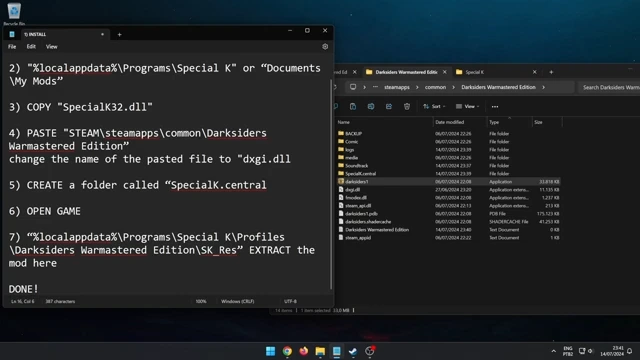
You can download the latest version of Special K using the download button available on this page. The setup package provided here allows you to install the software quickly on your Windows PC.
Installation Steps
- Click the download button available on this page.
- Save the setup file to your computer.
- After the download completes, locate the installer in your Downloads folder.
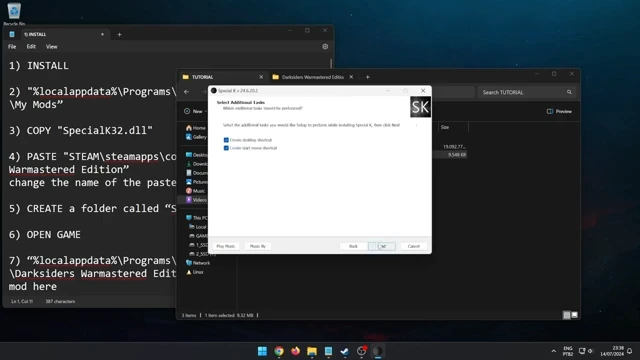
- Double-click the setup file to begin installation.
- Follow the on-screen instructions provided by the installation wizard.
- Choose an installation location if prompted.
- Complete the installation process and wait for all files to be copied.
- Launch Special K and configure the settings for your games.
After installation, you can start using the performance monitoring and optimization tools immediately.
Pros and Cons
Pros
- Powerful game optimization features
- Detailed performance monitoring tools
- Effective frame rate management
- Useful HDR enhancement options
- Supports many PC games
- Lightweight installation
- Helpful diagnostic information
- Regular community support
Cons
- Advanced settings may require learning
- Some features are game-dependent
- Not every game supports all functions
- Configuration options can feel overwhelming for new users
Conclusion
Special K is one of the most feature-rich game enhancement tools available for Windows users. It combines performance monitoring, frame rate management, HDR improvements, diagnostic tools, and graphics customization into a single package that can significantly improve the PC gaming experience.
For gamers who want deeper control over performance and visual quality, Special K offers tools that go far beyond standard in-game settings. The latest version can be downloaded using the download link provided on this page and installed in just a few minutes.
System Tools:
SuperF4
Process Termination Tool
ExplorerPatcher
Windows Customization Tool
WinUtil
Windows Tweaking Tool
Quick CPU
CPU Optimization Tool
Winaero Tweaker
Windows Tweaking Tool
See More
Gaming & Media:
Special K
Game Optimizer
Playnite
Game Library Manager
Filmmaker
Free Movie Maker
Roblox Account Manager
Roblox Account Manager
DirectX End User Runtime
Gaming graphics enhancement
See More
Internet & Network:
Neat Download Manager
Download Accelerator
Proton VPN
Secure Browsing
Psiphon VPN for PC
Secure Browsing
Iriun Webcam
Turn phone into webcam
Messenger for PC
Text messaging
See More
Productivity & Recovery:
PowerToys
Productivity Tool
Cura Software
3D printer slicing software
Power BI Desktop
Data visualization
4Download Fl Studio
Music production software
Anyunlock
iPhone unlock tool
See More