
1k
Downloads
45
Reviews
Latest Version
Version

XOutput Download Free for Windows (Latest Version)
Many PC games are designed to work best with Xbox controllers, which can create problems for players who prefer using other gamepads. Some controllers are not detected correctly, while others may not work at all in games that only support XInput devices.
XOutput helps solve this issue by converting DirectInput controllers into virtual Xbox 360 controllers. This allows Windows games to recognize a wider range of gamepads without requiring additional hardware. It is a practical solution for gamers who want better controller compatibility without replacing their existing devices.
Whether you use an older USB controller, a PlayStation gamepad, or another DirectInput device, XOutput can make it work with games that normally expect an Xbox controller.
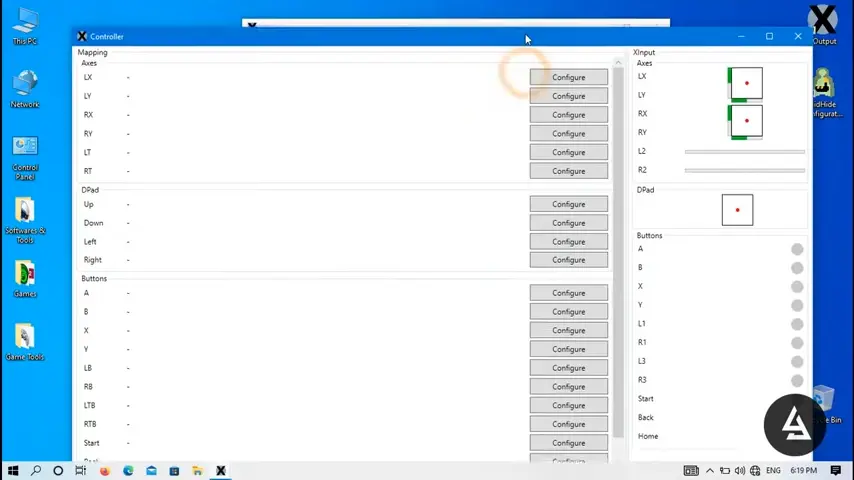
What is XOutput?
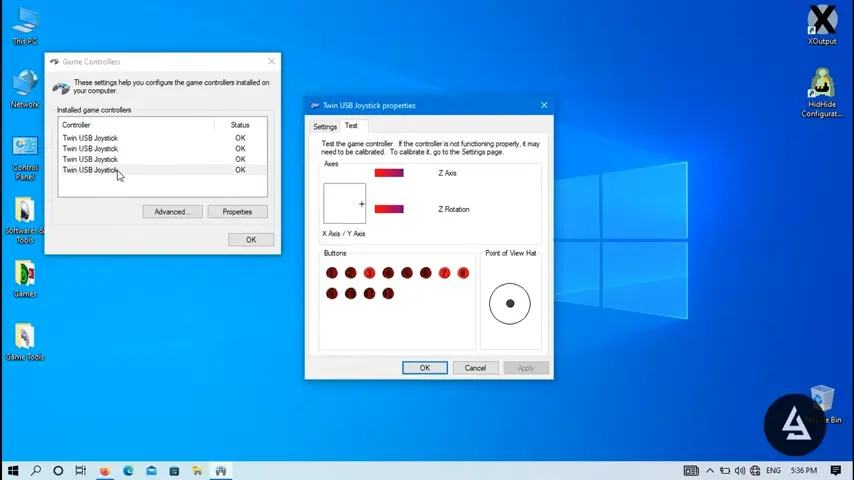
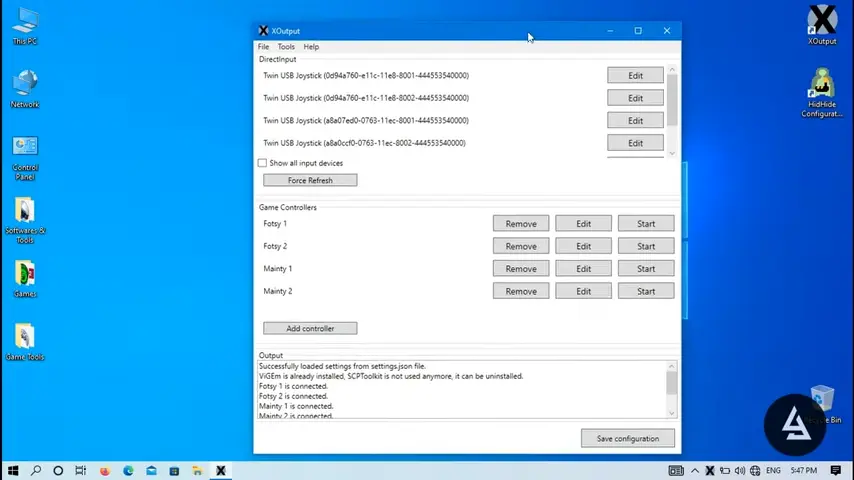
XOutput is a free Windows application that emulates an Xbox 360 controller using DirectInput devices. It works by creating a virtual XInput controller that games can recognize as a genuine Xbox gamepad.
The software is commonly used with PlayStation controllers, generic USB gamepads, racing wheels, flight sticks, and other gaming peripherals that may not offer native XInput support.
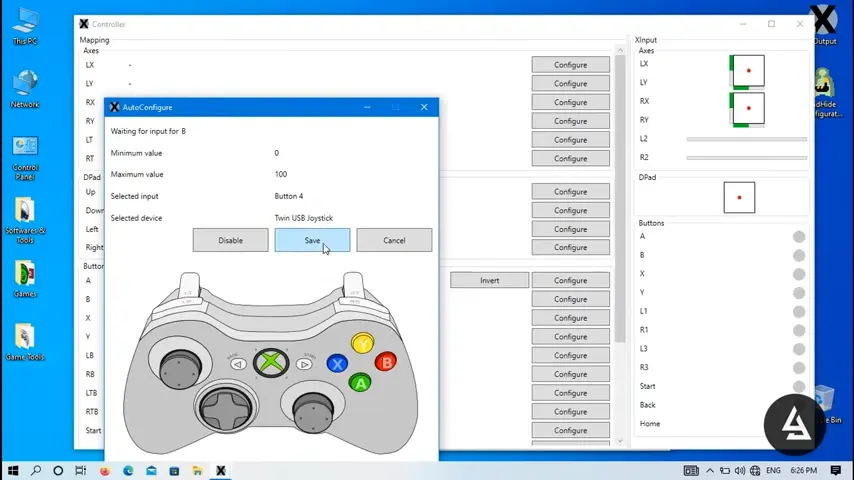
Since many modern PC games are optimized for Xbox controllers, XOutput acts as a compatibility bridge between unsupported hardware and Windows games. Users can map buttons, customize controller profiles, and fine-tune settings to achieve a comfortable gaming experience.
XOutput at a Glance
Feature | Description |
|---|---|
Controller Emulation | Converts DirectInput devices into Xbox 360 controllers |
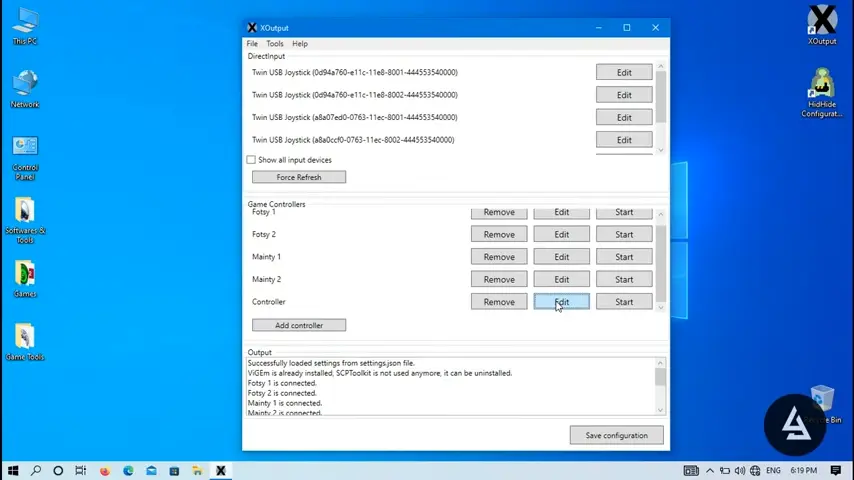
Custom Mapping | Configure buttons, triggers, and analog sticks |
Profile Support | Save and load custom controller profiles |
Multiple Devices | Supports several controllers simultaneously |
Free to Use | No purchase or subscription required |
Windows Compatibility | Works on most modern Windows versions |
Key Features of XOutput
Xbox 360 Controller Emulation
The main purpose of XOutput is to make unsupported controllers appear as Xbox 360 controllers. Games that only recognize XInput devices can detect and use these virtual controllers without additional modifications.
Custom Button Mapping
Users can assign buttons according to their preferences. If a gamepad layout feels uncomfortable, controls can be remapped to create a more natural gaming experience.
Support for Multiple Controllers
XOutput can manage several controllers at the same time. This feature is useful for local multiplayer games where multiple gamepads need to be connected and configured.
Profile Management
Players who manage large game libraries through Playnite can create different XOutput profiles for different games and switch between them as needed.
Adjustable Analog Stick Settings
Dead zones, sensitivity, and axis settings can be customized to improve controller accuracy. This is especially helpful for racing games, shooters, and simulation titles.
Broad Device Compatibility
XOutput works with a wide range of gaming hardware and can complement other gaming tools such as DirectX End-User Runtime, which many games require for proper controller and graphics support.
- PlayStation controllers
- Generic USB gamepads
- Racing wheels
- Flight sticks
- Arcade controllers
- Other DirectInput peripherals
Lightweight Performance
XOutput runs quietly in the background and consumes very few system resources, making it suitable even for older PCs.
System Requirements
Before installing XOutput, make sure your computer meets the following requirements.
Component | Requirement |
|---|---|
Operating System | Windows 7, Windows 8, Windows 10, Windows 11 |
Processor | Intel or AMD processor |
RAM | 2 GB minimum |
Storage | Less than 100 MB available space |
Framework | |
Controller | DirectInput-compatible device |
How to Download and Install XOutput
You can download the latest version of XOutput using the download button available on this page. Once the setup file has been downloaded, follow these steps to install and configure the software.
- Click the download button provided on this page.
- Save the setup file to your computer.
- Extract the downloaded archive if required.
- Install any required dependencies such as ViGEm Bus if prompted.
- Launch XOutput after installation.
- Connect your controller using USB or Bluetooth.
- Allow the software to detect the connected device.
- Create a controller profile and start the virtual controller.
- Open your favorite game and verify that the controller is recognized.
After setup is complete, most games should detect the virtual Xbox controller automatically.
Pros and Cons
Pros
- Free and lightweight software
- Supports many controller types
- Easy controller remapping options
- Works with games that require XInput
- Profile saving and management
- Supports multiple controllers
Cons
- Initial setup may be confusing for beginners
- Some controllers require additional drivers
- Occasional compatibility issues with specific games
- Interface looks outdated compared to newer alternatives
Conclusion
XOutput is a useful tool for gamers who want to use non-Xbox controllers in Windows games. Its ability to convert DirectInput devices into virtual Xbox 360 controllers helps improve compatibility across a wide range of titles. Features such as button mapping, profile management, and multi-controller support make it a flexible solution for different gaming setups.
For players who own PlayStation controllers, generic gamepads, racing wheels, or other unsupported devices, XOutput provides an effective way to enjoy modern PC games without purchasing new hardware. It remains one of the most practical controller emulation tools available for Windows users.
System Tools:
SuperF4
Process Termination Tool
ExplorerPatcher
Windows Customization Tool
WinUtil
Windows Tweaking Tool
Quick CPU
CPU Optimization Tool
Winaero Tweaker
Windows Tweaking Tool
See More
Gaming & Media:
HidHide
Controller Hiding
XOutput
Controller Emulator
DS4Windows
PlayStation Controller
Mod Organizer 2
Game Modding Tool
Borderless Gaming
Borderless Window Gaming Utility
See More
Internet & Network:
Neat Download Manager
Download Accelerator
Proton VPN
Secure Browsing
Psiphon VPN for PC
Secure Browsing
Iriun Webcam
Turn phone into webcam
Messenger for PC
Text messaging
See More
Productivity & Recovery:
PowerToys
Productivity Tool
Cura Software
3D printer slicing software
Power BI Desktop
Data visualization
4Download Fl Studio
Music production software
Anyunlock
iPhone unlock tool
See More